| exec | ||
| images | ||
| include | ||
| lib | ||
| src | ||
| test | ||
| .gitignore | ||
| LICENSE | ||
| platformio.ini | ||
| README.md | ||

Arduino-Photometrics
Arduino-photometrics is sub-part of Robot Go West, this project aim to collect lighting data of location for training a prediction model for retrieve the location of the sun.
The embedded part is made in C++, the update RTC time file and the extraction data measure file are made in Python.
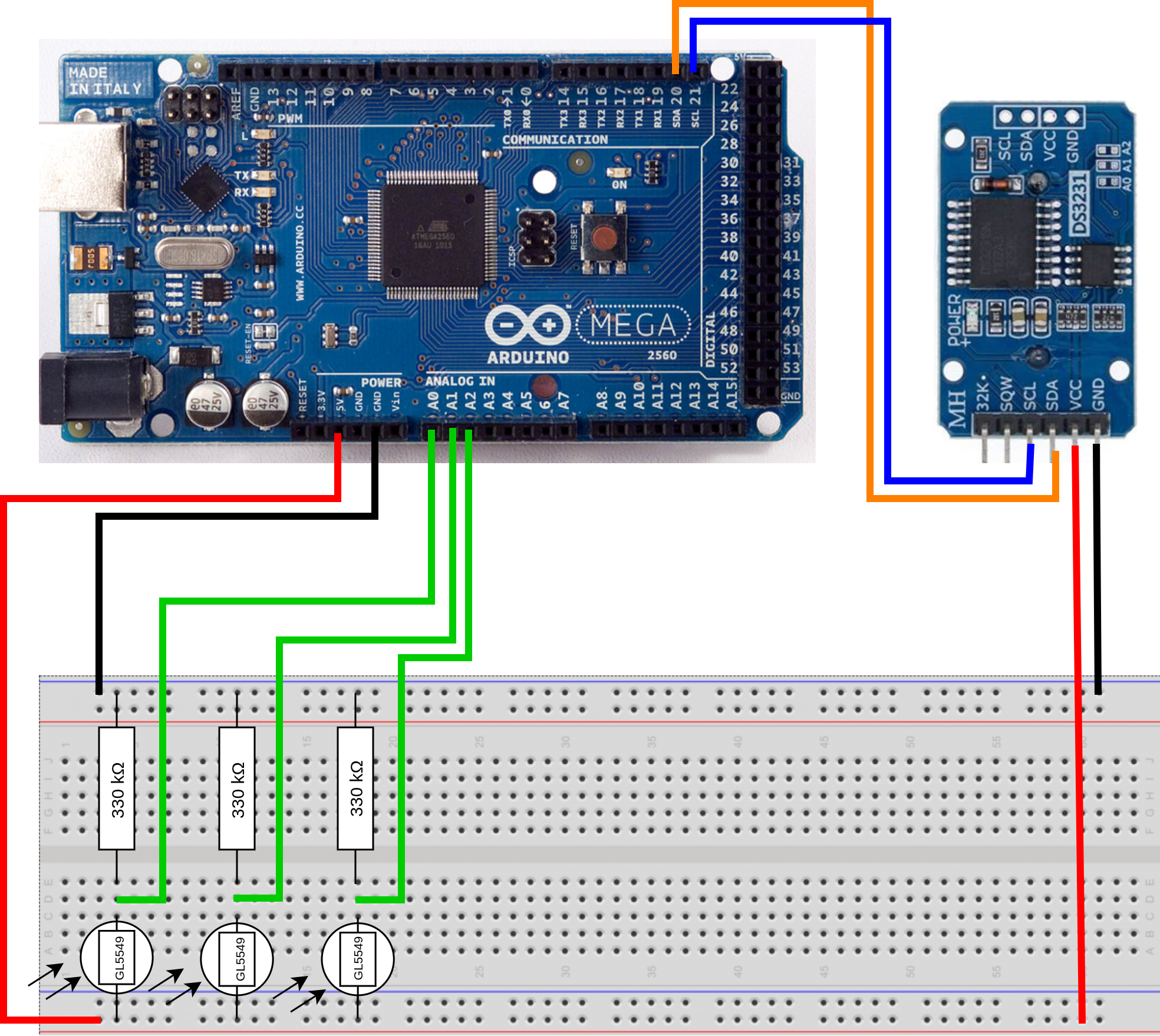
Arduino mounting
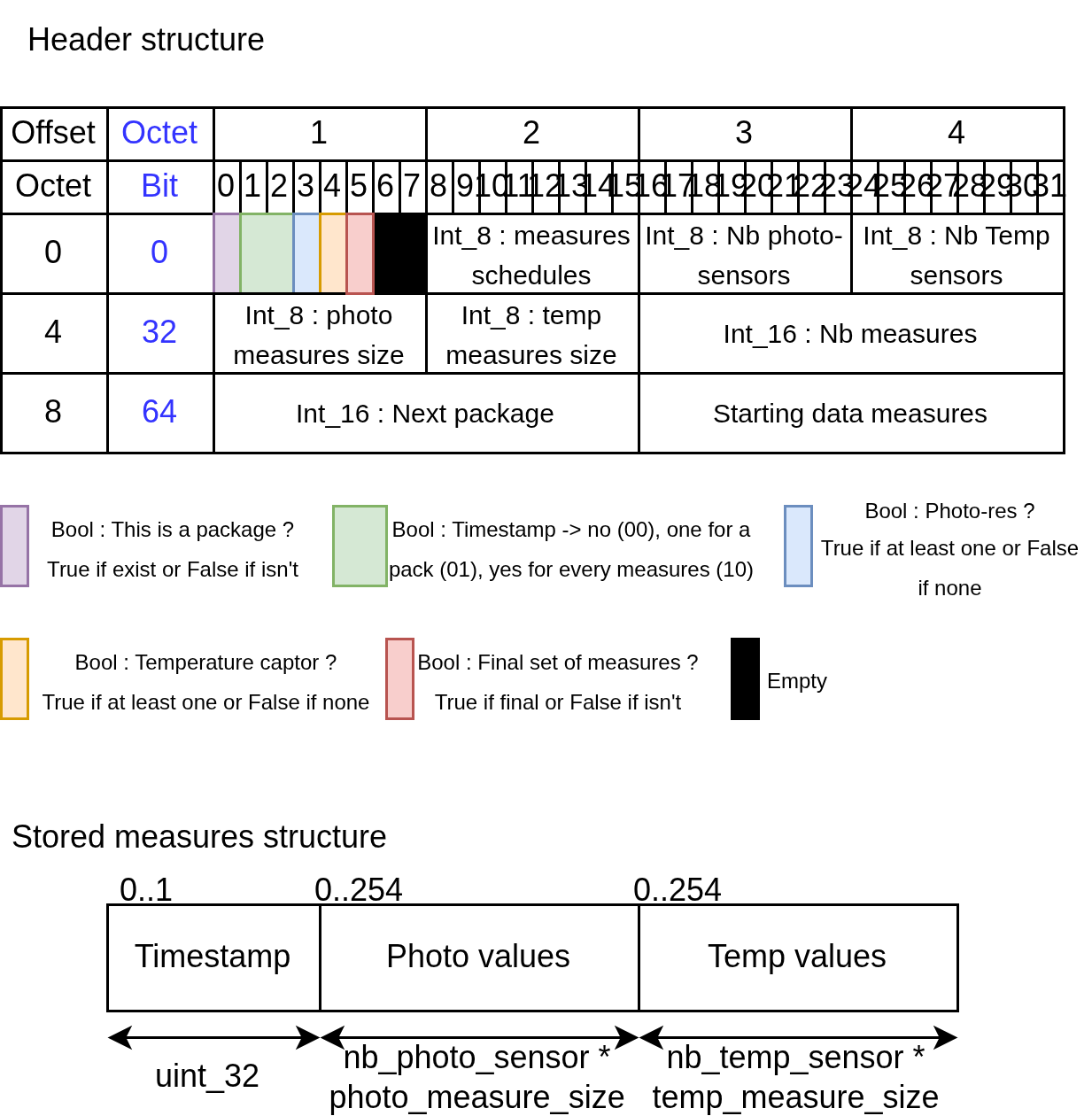
EEPROM header and data storage
The assembly collect data and write them in the EEPROM when the embedded system is deployed. To facilitate the understanding of the storage in the EEPROM see the following image.
Executable files
All executables files are in exec/ folder.
Tutorial
In first, you need to mount the arduino (image shown higher in the Readme). (Optional) You can download and create the support with a 3D printer from Link Text made by [id].
Now, you can simply download the project from this webpage.
Open VSCode with the PlatformIO extension on the project directory.
Verify that platformio has successfully opened the project.
Plug the arduino to your PC and check.
Run project tests graphically or with pio test.
Upload the project on the arduino.
Check RTC update.
Make a Sensor calibration.
Check that serial_com is well defined as false (boolean flag used to signal measurement or communication phases).
Connect your arduino near of a windows and let him take action.
After some time you can bring back the measure from the arduino to your PC.
Collect data with Gather.
Sensor calibration
This part aim to optain the measurement range with the lower and the upper threashold of your sensor. After the electrical mounting, place print_min_max_res() in the main loop function from the SensorManager object (compile and upload in the arduino).
Make a scale range by putting place photo sensors in the dark, for exemple with a box (darkest as possible). Then illuminate photo sensors with the direct lightin sun or a lamp (prefere the brightess as possible). Once the previous steps are done, write arduino min max serial printed data by print_min_max_res() into min_res and max_res for each sensor. The soft will normalise your data for compresse them in uint_8 type (smaller information to store). TODO: Improve this description parts
RTC update
Before build the project, uncoment the -D DEBUG line in platform.ini.
Set the communcation phase
Once previous steps are done, check the output on the serial port.
If the date is wrong, execute the update time file with python3 time.py .
The code permit a schedule change (winter or summer padding). You can change the value in the main file or simply disable it.
Gather measures
After a measure time. Set the communcation phase
Once the upload done, execute the download file with python3 download_csv.py to create a csv from collected data.
The download action remove whole arduino memory.
Set communication phase
Connect the arduino to your PC, set serial_com boolean to True, before uploading make you sure you don't upload when a writing datameasure phase to avoid corrupted data.
Known limitations
Data structure
- Issue: Storage structure work with uint_8 measure type but not with other type (First template function doesn't compile and work properly).
Nomadic system
- Improvement: Hardward and software are adapted to capture data with plugged into a standard electrical outlet, can be adapted for work with battery and power management.
CI pipeline gitlab
- Issue: failed for now, need to find how the serial port of the vm communicate with the pipeline interface
Calibration phase
- Improvement: Add an assisted phase to earn upper and lower threshold values to write in the code for the normalisation and storage.
Credit
This projet are entirely made by Aurélien Gauthier.
The project use two library: - Low-Power for the management of sleep system. - DS3231 lib for the management of the DS3231 RTC module.